 Incented
Multisig Wallets
Shared wallets that require multiple approvals
A multisig (multi-signature) wallet requires multiple people to approve transactions. Instead of one person controlling funds, a group shares control. This is how organizations manage funds securely on-chain.
Why Multisig?
With a regular wallet, whoever has the private key has full control. If that key is lost or stolen, the funds are gone.
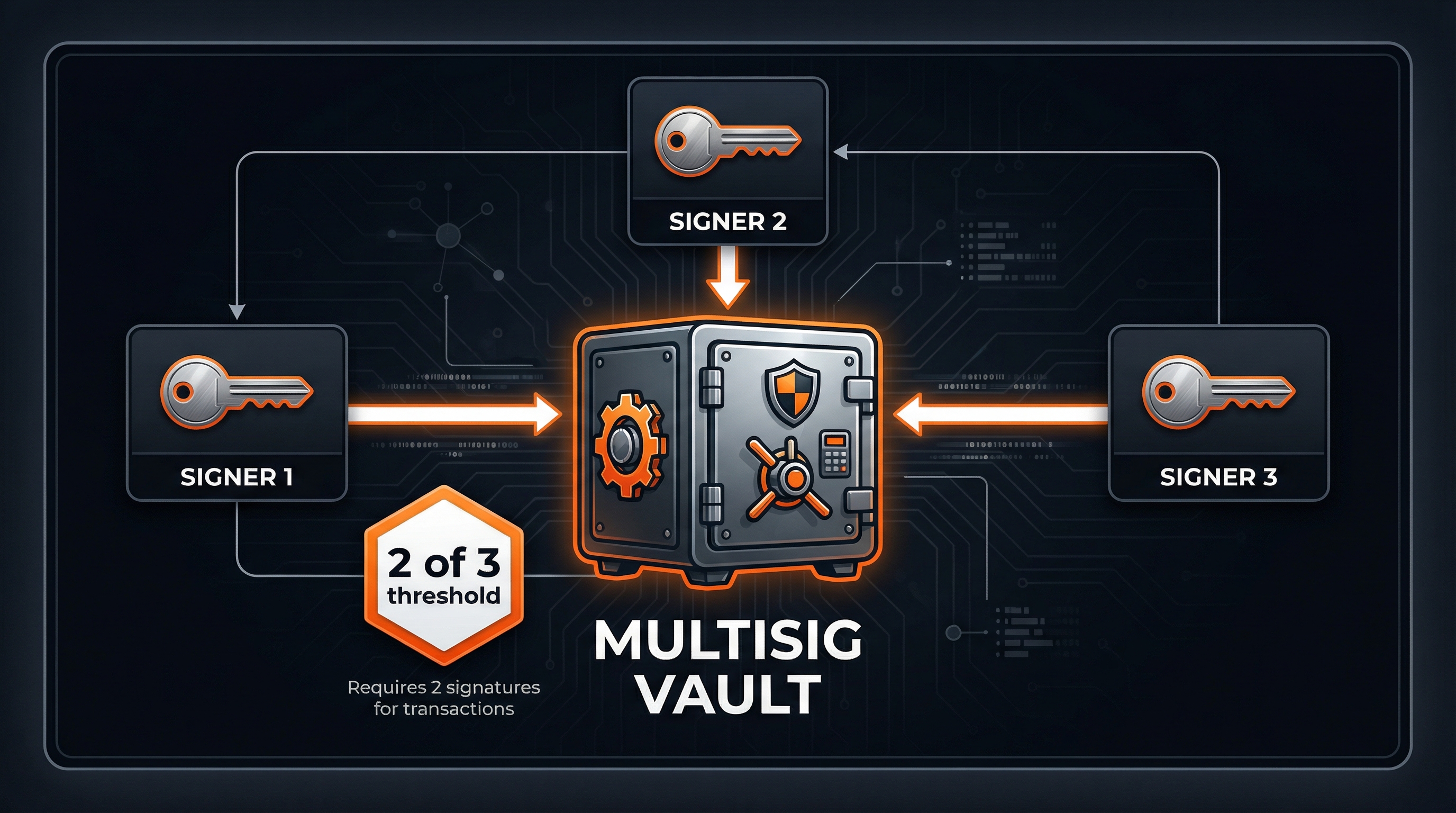
A multisig changes the model: you define a set of owners and a threshold. For example, "3 of 5" means any 3 of the 5 owners must approve before a transaction goes through. This provides:
- No single point of failure. One lost key doesn't mean lost funds.
- Shared accountability. Multiple people must agree on spending.
- Protection from theft. A compromised key alone isn't enough to steal.
How It Works
- Someone proposes a transaction (send tokens to address X)
- Owners review and sign if they approve
- Once the threshold is met, anyone can execute
- The transaction processes on-chain
Until the threshold is met, nothing happens. Unsigned transactions just wait.
Multisig Protocols
Different blockchains use different multisig systems:
Safe (formerly Gnosis Safe) is the standard for EVM chains. It's battle-tested, widely used, and has a clean interface at safe.global.
Squads is the leading multisig for Solana. Similar concept, built natively for Solana's architecture. Interface at squads.so.
For Program Managers
Every Incented program has its own multisig wallet. When you create a program, you specify:
- Owners - Wallet addresses that can sign transactions
- Threshold - How many signatures are required (e.g., 2 of 3)
The system automatically includes your wallet and the platform's operational wallet (needed for settlement processing).
Choosing a Threshold
| Setup | Tradeoff |
|---|---|
| 1 of 1 | Fast but risky. Single point of failure. |
| 2 of 3 | Good balance. Common choice. |
| 3 of 5 | More secure but slower to approve. |
For most programs, 2 of 3 works well. You get security without making every payout a coordination challenge.
Funding the Multisig
Before your program can start, you need to send tokens to the multisig:
- Find the multisig address in your program settings
- Transfer the award pool tokens
- Transfer the voting pool tokens
- Transfer some native tokens (ETH/SOL) for gas
The multisig address is also shown on your program's public page, below the banner next to the status pill.
Approving Transactions
After settlement runs, transactions are queued in your multisig. Owners need to sign them for payouts to happen.
Safe (EVM)
- Go to app.safe.global
- Connect your wallet
- Find your Safe in the list
- Go to Transactions → Queue
- Review each transaction (recipient, amount, token)
- Click Confirm and sign in your wallet
- Once threshold is met, anyone can click Execute
Squads (Solana)
- Go to app.squads.so
- Connect your Solana wallet
- Find your Squad
- Go to Transactions → Pending
- Review and click Approve
- After threshold, click Execute
What to Check
Before signing, verify:
- The recipient address looks right
- The amount matches what you expect
- The token is correct
If something looks off, don't sign. Check with other owners first.
Managing Owners
Over time you might need to add or remove owners:
Adding an owner: In Safe or Squads settings, propose adding the new address. Existing owners must approve the change.
Removing an owner: Same process, but be careful. Make sure you don't drop below the threshold.
Changing the threshold: Also requires existing owner approval. Think carefully before reducing it.
Security Practices
Use hardware wallets for signing when possible. They keep your keys offline.
Distribute owners geographically. If all owners are in one place, a local disaster could lock you out.
Establish communication channels. Discord, Telegram, or Signal group for coordinating signatures.
Review transactions carefully. Don't just rubber-stamp. Actually look at what you're signing.
Do regular access reviews. Remove owners who've left the team. Update keys if someone might be compromised.
Common Issues
"Not enough signatures" - More owners need to approve before the transaction can execute.
"Insufficient funds" - The multisig doesn't have enough tokens. Fund it before executing.
"Can't find my Safe/Squad" - Make sure you're connected with the right wallet on the right network.
"Transaction expired" - Some transactions have timeouts. You may need to create a new one.
Quick Links
- Safe: app.safe.global | docs.safe.global
- Squads: app.squads.so | docs.squads.so